
When planning a professional live streaming platform, two names frequently appear in technical discussions: FFmpeg and Wowza Streaming Engine.
Both are widely used in video broadcasting, but they are not direct competitors in every situation.
FFmpeg is primarily a multimedia processing framework, while Wowza Streaming Engine is a commercial streaming server platform designed to receive, manage and distribute live and on-demand video.
Understanding this distinction is important for broadcasters who want to build reliable infrastructure without paying for unnecessary software or hardware.
For organisations operating television channels, live events or multiple broadcasting services, the choice of software also influences the configuration of their dedicated streaming servers.
In some environments, FFmpeg provides everything needed for a particular processing task. In others, Wowza offers valuable streaming management capabilities. Many professional deployments benefit from using both.
1. What Is FFmpeg?
FFmpeg is an open-source multimedia framework that supports video encoding, decoding, transcoding, recording and conversion between numerous media formats.
It is commonly used by broadcasters, video platforms and developers who need flexible control over media processing.
For example, FFmpeg can receive an existing video stream, change its resolution, encode it using H.264 and transmit the resulting output to an RTMP destination.
It can also generate HLS segments, extract audio, create thumbnails and process prerecorded video files.
One of FFmpeg’s greatest advantages is automation.
Because it can operate through the Linux command line, administrators can integrate it into scripts, scheduled tasks and custom broadcasting applications.
This flexibility makes FFmpeg particularly attractive for technically experienced operators.
However, FFmpeg is not, by itself, a complete commercial streaming management platform with the same built-in administration features as Wowza.
2. What Is Wowza Streaming Engine?
Wowza Streaming Engine is commercial software designed for professional streaming workflows.
It can receive live video from encoders, manage streaming applications, distribute content using supported protocols and provide administrative tools for operating streaming services.
Unlike FFmpeg, which is primarily controlled through commands and application integrations, Wowza includes a streaming server environment with management capabilities.
Broadcasters can use Wowza for live streaming, recording, video delivery and specialised workflows.
Its functionality depends on the software version, configuration and available licensing.
The official Wowza Streaming Engine documentation provides information about supported workflows, configuration and administration.
For organisations managing numerous streams, a centralised streaming platform can reduce the amount of custom development required.
Nevertheless, Wowza does not eliminate the need for appropriate hardware, network capacity or technical management.
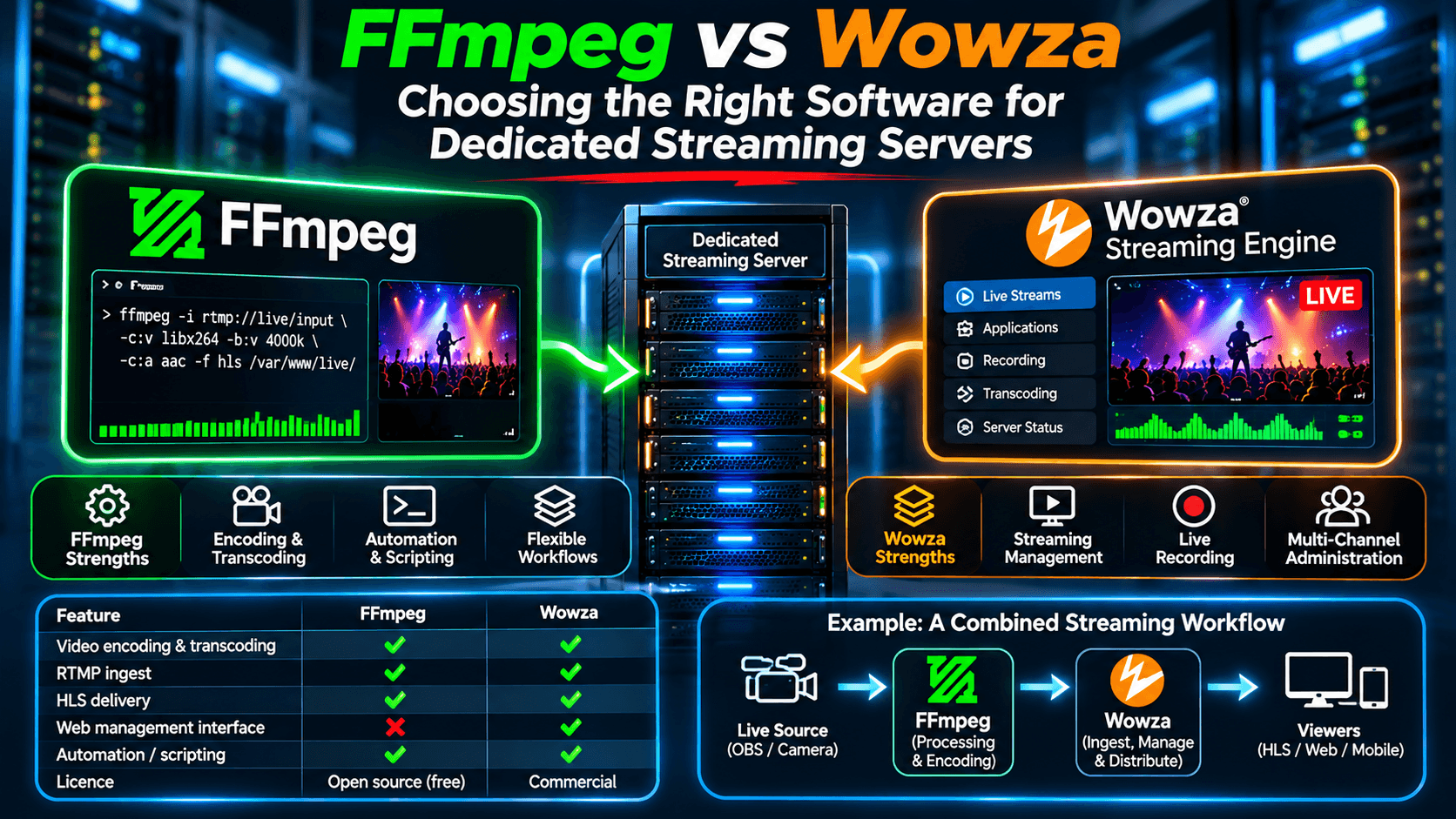
3. FFmpeg vs Wowza: Technical Comparison
The following table summarises the principal differences.
| Feature | FFmpeg | Wowza Streaming Engine |
|---|---|---|
| Primary purpose | Media processing | Streaming server platform |
| Licensing | Open source | Commercial |
| Video encoding | Extensive capabilities | Workflow-dependent transcoding |
| RTMP input | Supported | Supported |
| HLS output | Can generate HLS media | Supports HLS delivery |
| Live recording | Supported | Supported |
| Web management interface | Not built in | Available |
| Automation | Scripts and APIs | APIs and server management |
| Custom development | Highly flexible | Platform-based integration |
| Best suited for | Encoding and processing | Managed streaming workflows |
The comparison illustrates why asking whether FFmpeg is better than Wowza is not always the right question.
They solve overlapping but different problems.
A broadcasting system may use FFmpeg to prepare video while relying on Wowza to manage ingest, playback and recording.
4. Which Technology Uses More CPU?
There is no universal answer.
CPU consumption depends primarily on the operations being performed rather than the software name.
Consider a broadcaster transmitting an existing H.264 stream without changing its video encoding.
Relaying or repackaging that stream may require relatively little processing power.
Now consider another broadcaster converting a 1080p source into several resolutions simultaneously.
That operation can consume substantial CPU resources, whether the processing is performed through FFmpeg or a configured transcoding workflow in Wowza.
The following table illustrates the difference between operations.
| Operation | Typical processing demand |
|---|---|
| Relaying an existing RTMP stream | Low |
| Repackaging compatible media for HLS | Low to moderate |
| Recording without re-encoding | Usually low |
| Transcoding 1080p into multiple outputs | High |
| Software transcoding several 4K streams | Very high |
These are qualitative estimates, not benchmarks.
Actual performance depends on processor architecture, encoding presets, codecs, frame rates and hardware acceleration.
For professional deployments, testing the intended workload is more reliable than estimating performance from software specifications alone.
5. When FFmpeg Is the Better Choice
FFmpeg is particularly useful when a broadcaster needs flexible multimedia processing without requiring a complete streaming management platform.
Imagine a company that receives prerecorded programmes and wants to convert them automatically into a standard format before broadcasting.
FFmpeg can process the files, adjust audio levels, change video resolution and prepare the output for distribution.
Another example is a developer building a custom video platform.
Instead of purchasing a complete commercial streaming system, the developer may prefer to combine FFmpeg with other open-source components.
FFmpeg can be especially attractive for:
- Automated video conversion and encoding.
- Custom live streaming workflows.
- Recording and processing media files.
- Generating multiple video resolutions.
- Integrating media processing into custom applications.
- Building cost-conscious streaming infrastructure.
However, its flexibility comes with additional administrative responsibility.
Developers may need to create their own monitoring, process management, user administration and error recovery systems.
For technically experienced teams, this can be an advantage. For organisations without dedicated technical staff, it can become a challenge.
6. When Wowza Is the Better Choice
Wowza Streaming Engine can be useful when an organisation wants an established streaming platform rather than assembling all the necessary components independently.
Consider a company operating several professional television channels.
The company may need separate streaming applications, controlled publishing access, recording functionality and centralised administration.
Wowza can provide an integrated environment for many of these requirements.
Its commercial licensing introduces additional costs, but those costs may be justified when the platform reduces development and administration work.
Wowza may be particularly appropriate for:
- Professional streaming applications.
- Multi-channel broadcasting environments.
- Managed RTMP ingest and HLS delivery.
- Recording and specialised streaming workflows.
- Organisations requiring a commercial streaming platform.
- Deployments where centralised administration is important.
Of course, installing Wowza does not automatically guarantee reliable streaming.
The operating system, network, storage, security configuration and application settings must still be maintained.
7. Can FFmpeg and Wowza Work Together?
Absolutely. In fact, combining them can be a practical approach.
Consider a hypothetical television broadcaster receiving several live feeds.
The broadcaster wants to standardise the video format, generate different resolutions and distribute the streams to viewers.
One possible architecture is:
Live Camera or OBS Encoder
?
FFmpeg Video Processing
?
Wowza Streaming Engine
?
HLS Distribution
?
Web and Mobile Viewers
FFmpeg handles the media processing tasks, while Wowza manages the streaming application and delivery workflow.
This arrangement allows each component to perform the tasks for which it is particularly suitable.
However, it is not mandatory to use both.
A broadcaster may use Wowza’s available transcoding capabilities without a separate FFmpeg process, or build a streaming platform around FFmpeg and NGINX-based components.
The best architecture depends on operational requirements.
8. What About NGINX RTMP?
NGINX-based RTMP solutions are another important option.
An RTMP module can allow NGINX to receive and relay live streams, while additional components can support HLS distribution.
For simple broadcasting requirements, this approach may be efficient and economical.
It is especially useful when streams are already encoded correctly and do not require extensive processing.
However, advanced recording, administration, transcoding and user management may require additional software.
This is where the distinction between an individual streaming component and a complete managed platform becomes important.
FFmpeg, NGINX RTMP and Wowza are not necessarily alternatives that exclude one another.
They can be combined into an architecture designed around the broadcaster’s needs.
For further background on hardware selection, our related article at Hosting Marketers discusses dedicated streaming infrastructure and the importance of encoding performance.
9. A Practical Cost Comparison
Software licensing is only one part of the total cost of operating a streaming platform.
Imagine two hypothetical broadcasters.
Broadcaster A operates three live television channels using existing H.264 streams. No additional transcoding is required.
Broadcaster B operates 25 channels, requires recording, separate streaming applications and more complex administration.
Their priorities are different.
| Cost factor | Small FFmpeg-based deployment | Managed Wowza deployment |
|---|---|---|
| Software licence | No FFmpeg licence fee | Commercial licence |
| Initial configuration | Technical setup required | Platform setup required |
| Custom development | May be necessary | Depends on requirements |
| Ongoing maintenance | Administrator responsibility | Administrator or provider |
| Server hardware | Workload-dependent | Workload-dependent |
| Technical support | Community or contracted support | Vendor/provider options |
These are general considerations rather than a quotation.
FFmpeg is open source, but the total deployment is not necessarily free.
Linux administration, monitoring, software integration and technical support all have costs.
Similarly, Wowza licensing may increase monthly expenses while reducing the need to develop certain features independently.
The correct financial comparison is therefore the total cost of operating the streaming service, not simply the price of the software licence.
10. Why Dedicated Infrastructure Makes a Difference
Regardless of the software selected, dedicated infrastructure can provide important operational advantages.
A dedicated server gives the broadcaster predictable access to processor resources, memory and storage.
It also allows greater control over operating-system configuration, streaming applications and network services.
This is especially valuable when multiple FFmpeg processes or streaming applications operate continuously.
However, dedicated hardware should not be confused with unlimited performance.
A server with a 10 Gbps network port may still have a monthly traffic allowance, while a powerful processor may struggle with an excessive transcoding workload.
Capacity planning remains essential.
For professional broadcasting, a managed server can also reduce the burden of maintaining the underlying infrastructure.
The broadcaster can concentrate on producing and distributing content while technical staff handle software configuration, operating-system maintenance and troubleshooting.
11. Reliability Depends on More Than Software
One lesson from operating streaming infrastructure is that software selection alone does not determine reliability.
A well-configured open-source platform can perform exceptionally well.
A poorly configured commercial streaming platform can experience interruptions despite its advanced features.
Common problems include excessive CPU utilisation, storage exhaustion, unstable network connections and unsuitable player buffering.
These problems must be investigated systematically.
Monitoring server resources, reviewing application logs and testing the complete delivery workflow are important parts of maintaining reliable broadcasts.
For international streaming, network routing and geographical server placement can also affect performance.
The most effective infrastructure combines suitable software with careful configuration and ongoing technical management.
Conclusion: FFmpeg or Wowza?
FFmpeg and Wowza Streaming Engine are both valuable technologies, but they serve different purposes.
FFmpeg excels at flexible multimedia processing, encoding, transcoding and automation.
Wowza provides a commercial streaming server environment with administration and delivery capabilities.
For some broadcasters, an FFmpeg-based system is entirely sufficient.
Others benefit from Wowza’s integrated features.
And for more complex projects, combining the two may provide the most practical solution.
The objective should not be to choose the most famous streaming software, but to build a reliable broadcasting system that meets the actual technical and financial requirements.
When the software, dedicated hardware and network architecture are properly matched, broadcasters can create streaming platforms that are both efficient and capable of growing with their audience.